-

Microsoft Roth 401(k) & Mega Backdoor Roth Strategy Guide 2025
Microsoft Corporation’s Savings Plus 401(k) Plan gives you every tool needed to build tax-free retirement wealth: Roth salary deferrals, generous after-tax capacity, and instant in-plan conversions. This guide explains how to harness those features in 2025 so you can graduate from “traditional saver” to future tax-free millionaire. ✅ Available: Microsoft Roth 401(k) Pre-tax and Roth deferrals run through the same Fidelity portal. Switching your paycheck elections to Roth lets you pay taxes now while locking in tax-free qualified withdrawals later. Catch-up contributions ($7,500) can be directed to Roth as well. ✅ Available: Mega Backdoor Roth via After-Tax Contributions Microsoft supports sizable after-tax contributions (historically up to $34,500) plus in-plan Roth conversions. That combination satisfies the two critical requirements for executing a mega backdoor Roth inside Fidelity NetBenefits. Roth 401(k) Benefits for Microsoft Employees The Roth 401(k) bucket grows tax-free and distributes tax-free as long as you hold the account for five years and reach age 59½. Because Microsoft allows you to defer up to 65% of eligible pay (subject to the IRS $23,000 limit, or $30,500 with catch-up), high earners can rapidly build Roth balances while still collecting the full employer match. Mega Backdoor Roth Playbook Microsoft’s plan checks every box for the mega backdoor Roth (MBDR) tactic: after-tax contributions, in-plan conversions, and a high overall contribution ceiling (IRS Section 415(c) limit of $69,000, or $76,500 with catch-up). By filling the after-tax bucket and immediately converting it to Roth, you can move tens of thousands of dollars into tax-free growth every year. Interactive Roth vs. Traditional Calculator .available-feature { background: #f3f9ff; border-left: 4px solid #1966d2; padding: 1.25rem 1.5rem; border-radius: 0.75rem; margin: 1.5rem 0; } .strategy-comparison { background: #f7fbff; border: 1px solid #d4e5ff; border-radius: 0.75rem; padding: 1.25rem 1.75rem; margin: 1.5rem 0; } .wp-block-group.roth-calculator, .wp-block-group.mbdr-calculator { background: #f3f3f3; border: 1px solid #cccccc; border-radius: 0.9rem; padding: 1.5rem; margin: 2rem auto; max-width: 60%; } .wp-block-group.roth-calculator h3, .wp-block-group.mbdr-calculator h3 { margin-top: 0; color: #143c7d; } .calculator-inputs { display: flex; flex-direction: column; gap: 1rem; margin-bottom: 1.25rem; } .calculator-inputs label { display: flex; flex-direction: column; font-weight: 700; color: #102a53; } .calculator-inputs input, .calculator-inputs select { margin-top: 0.5rem; padding: 0.65rem 0.8rem; border-radius: 0.6rem; border: 1px solid #b8c7e3; font-size: 1rem; background: #ffffff; max-width: 18rem; } .calculator-inputs button { align-self: flex-start; padding: 0.85rem 1.4rem; border: none; border-radius: 0.6rem; background: #4CAF50; color: #ffffff; font-weight: 700; cursor: pointer; transition: transform 0.15s ease, box-shadow 0.15s ease; } .calculator-inputs button:hover { transform: translateY(-1px); box-shadow: 0 8px 16px rgba(76, 175, 80, 0.25); } .calculator-results { background: #ffffff; border-radius: 0.75rem; border: 1px solid #d5deef; padding: 1.1rem; color: #0f2557; } .calculator-results p { margin: 0.5rem 0; } .calculator-results ul { padding-left: 1.25rem; margin: 0.5rem 0; } .calculator-note { font-size: 0.9rem; color: #374f7a; margin-top: 0.75rem; } @media (max-width: 960px) { .wp-block-group.roth-calculator, .wp-block-group.mbdr-calculator { max-width: 90%; } } @media (max-width: 640px) { .calculator-inputs input, .calculator-inputs select { max-width: 100%; } } Roth vs. Traditional 401(k) Calculator for Microsoft Employees Current Age Household Income ($) Current Tax Bracket 12%22%24%32%35%37% Expected Retirement Tax Bracket 12%22%24%32% Annual Contribution ($) Expected Annual Return (%) Compare Roth vs. Traditional Assumes retirement at age 65 and constant contribution/return rates. Adjust inputs to reflect your tax outlook. const IRS_DEFERRAL_LIMIT = 23000; const CATCH_UP_LIMIT = 7500; const IRS_415C_LIMIT = 69000; function parseCurrencyInput(rawValue) { if (rawValue === undefined || rawValue === null) { return 0; } const cleaned = rawValue.toString().replace(/,/g, ”).trim(); const numeric = Number(cleaned); if (Number.isNaN(numeric)) { return 0; } return numeric; } function formatCurrency(value) { return ‘$’ + value.toLocaleString(‘en-US’, { minimumFractionDigits: 2, maximumFractionDigits: 2 }); } function formatCompactCurrency(value) { return ‘$’ + value.toLocaleString(‘en-US’, { maximumFractionDigits: 2 }); } function syncCurrencyInput(id) { const el = document.getElementById(id); if (!el) { return; } el.value = parseCurrencyInput(el.value).toLocaleString(‘en-US’, { maximumFractionDigits: 0 }); } function calculateFutureValue(contribution, years, rate) { if (rate === 0) { return contribution * years; } const futureFactor = Math.pow(1 + rate, years) – 1; return contribution * futureFactor / rate; } function calculateRothComparison() { syncCurrencyInput(‘rcIncome’); syncCurrencyInput(‘rcContribution’); const age = Number(document.getElementById(‘rcCurrentAge’).value); const income = parseCurrencyInput(document.getElementById(‘rcIncome’).value); const currentTax = Number(document.getElementById(‘rcCurrentTax’).value); const retirementTax = Number(document.getElementById(‘rcRetirementTax’).value); const annualContribution = parseCurrencyInput(document.getElementById(‘rcContribution’).value); const annualReturnPercent = Number(document.getElementById(‘rcReturn’).value); const output = document.getElementById(‘rcResults’); if (age < 18 || annualContribution
-

Microsoft 401(k): Unlock Every Match Dollar and Compound Your Contribution
The Microsoft Corporation Savings Plus 401(k) Plan is a wealth-building powerhouse. With immediate vesting, broad Roth and after-tax flexibility, and a generous employer match, disciplined saving today can realistically put you on the path to 401(k) millionaire status. This 2025 playbook shows you exactly how to capture every “free money” dollar Microsoft offers and keep your retirement trajectory compounding upward. Microsoft’s 2025 Employer Match Snapshot Core Microsoft, LinkedIn, GitHub, ZeniMax, and other subsidiaries: Microsoft contributes $0.50 for every $1 you defer on a pre-tax or Roth basis, matching your salary deferrals all the way up to the IRS elective deferral limit (currently $23,000). When you contribute the full limit, Microsoft adds $11,500 in employer dollars. inXile Entertainment & Double Fine Productions: These studios receive $0.25 per $1 deferred on pre-tax or Roth contributions, up to that same IRS limit. Contributing $23,000 generates a maximum $5,750 match. Immediate vesting & no safe harbor designation: Every match dollar is yours instantly. Because the plan isn’t classified as safe harbor, stay mindful of annual ADP/ACP testing—front-load savings if you are a highly compensated employee. Contribution Limits, Catch-Up Rules, and Mega Backdoor Potential Microsoft lets you combine pre-tax, Roth, and after-tax percentages up to 65% of eligible pay each paycheck. The latest published IRS elective deferral limit remains $23,000, with an additional $7,500 catch-up allowance for employees turning age 50 by year-end. Catch-up dollars are not matched, but they still reduce taxable income (pre-tax) or can be directed to Roth for future tax-free growth. After maximizing pre-tax and Roth contributions, you can push as much as $34,500 (per 2024 filing) into after-tax contributions. Pair those dollars with Microsoft’s in-plan Roth conversion feature—or roll after-tax balances to a Roth IRA if you exit—to execute the mega backdoor Roth strategy and grow more money tax-free. Need more investment choice? Fidelity BrokerageLink opens a self-directed brokerage window alongside the default BlackRock LifePath Index CITs, Vanguard index trusts, and Fidelity pooled funds. Just remember: Microsoft only matches what you contribute; the sooner you hit the match threshold, the faster every investment option can compound. .key-takeaways { background: #f4f8ff; border-left: 4px solid #1846a3; padding: 1.25rem 1.5rem; border-radius: 0.75rem; margin: 1.5rem 0; } .highlight-box { background: linear-gradient(135deg, #eef4ff 0%, #f7fbff 100%); border-left: 4px solid #2560c4; padding: 1.5rem; border-radius: 0.75rem; box-shadow: 0 10px 30px rgba(37, 96, 196, 0.12); } .wp-block-group.match-calculator, .wp-block-group.projection-calculator { background: #f3f3f3; border: 1px solid #cccccc; border-radius: 0.9rem; padding: 1.5rem; margin: 2rem auto; max-width: 60%; } .wp-block-group.match-calculator h3, .wp-block-group.projection-calculator h3 { margin-top: 0; color: #143c7d; } .calculator-inputs { display: flex; flex-direction: column; gap: 1rem; margin-bottom: 1.25rem; } .calculator-inputs label { display: flex; flex-direction: column; font-weight: 700; color: #102a53; } .calculator-inputs input, .calculator-inputs select { margin-top: 0.5rem; padding: 0.65rem 0.8rem; border-radius: 0.6rem; border: 1px solid #b8c7e3; font-size: 1rem; background: #ffffff; max-width: 18rem; } .calculator-inputs button { align-self: flex-start; padding: 0.85rem 1.4rem; border: none; border-radius: 0.6rem; background: #4CAF50; color: #ffffff; font-weight: 700; cursor: pointer; transition: transform 0.15s ease, box-shadow 0.15s ease; } .calculator-inputs button:hover { transform: translateY(-1px); box-shadow: 0 8px 16px rgba(76, 175, 80, 0.25); } .calculator-results { background: #ffffff; border-radius: 0.75rem; border: 1px solid #d5deef; padding: 1.1rem; color: #0f2557; } .calculator-results p { margin: 0.5rem 0; } .calculator-results ul { padding-left: 1.25rem; margin: 0.5rem 0; } .calculator-note { font-size: 0.9rem; color: #374f7a; margin-top: 0.75rem; } .action-list { list-style: decimal; padding-left: 1.5rem; line-height: 1.6; } @media (max-width: 960px) { .wp-block-group.match-calculator, .wp-block-group.projection-calculator { max-width: 90%; } } @media (max-width: 640px) { .calculator-inputs input, .calculator-inputs select { max-width: 100%; } } Interactive Microsoft 401(k) Match Calculator 2025 Microsoft Match Maximizer Enter Your Annual Salary ($) Select Pay Frequency Bi-weekly (26 pays)Semi-monthly (24 pays)Monthly (12 pays) Business Unit Core Microsoft, LinkedIn, GitHub, ZeniMax, etc.inXile & Double Fine studios Age 50+ Catch-Up? NoYes (adds $7,500 employee-only) Calculate My Match The IRS has not yet released a 2025 elective deferral limit. Calculations use the most recent published figures ($23,000 plus $7,500 catch-up) so you can plan contributions now and adjust quickly when the IRS updates guidance. const IRS_LIMIT = 23000; const CATCH_UP_LIMIT = 7500; const PAY_PERCENT_CAP = 0.65; function parseCurrencyInput(rawValue) { if (rawValue === undefined || rawValue === null) { return 0; } const cleaned = rawValue.toString().replace(/,/g, ”).trim(); const numeric = Number(cleaned); if (Number.isNaN(numeric)) { return 0; } return numeric; } function syncCurrencyInput(id) { const element = document.getElementById(id); if (!element) { return; } const numeric = parseCurrencyInput(element.value); element.value = formatCurrency(numeric).replace(‘$’, ”); } function getCurrencyInput(id) { const element = document.getElementById(id); if (!element) { return 0; } return parseCurrencyInput(element.value); } function formatCurrency(value) { const formatted = value.toLocaleString(‘en-US’, { minimumFractionDigits: 2, maximumFractionDigits: 2 }); return ‘$’ + formatted; } function formatPercent(value) { return value.toFixed(2) + ‘%’; } function getBusinessProfile(unit) { if (unit === ‘inxile’) { return { label: ‘inXile & Double Fine’, matchRate: 0.25, eligibleFraction: 1.0 }; } return { label: ‘Core Microsoft businesses’, matchRate: 0.50, eligibleFraction: 1.0 }; } function calculateMicrosoftMatch() { syncCurrencyInput(‘matchSalary’); const salary = getCurrencyInput(‘matchSalary’); const periodField = document.getElementById(‘matchPayPeriods’); const periodValue = Number(periodField.value); let payPeriods = periodValue; if (Number.isNaN(periodValue)) { payPeriods = 26; } const unit = document.getElementById(‘matchBusinessUnit’).value; const catchUpChoice = document.getElementById(‘matchCatchUp’).value; const resultsContainer = document.getElementById(‘matchResults’); if (salary salary) { employeeContributionCap = salary; } const matchEligibleEmployeeCap = IRS_LIMIT * profile.eligibleFraction; let attainableEmployeeForMatch = matchEligibleEmployeeCap; if (employeeContributionCap < attainableEmployeeForMatch) { attainableEmployeeForMatch = employeeContributionCap; } if (salary < attainableEmployeeForMatch) { attainableEmployeeForMatch = salary; } const employerMatchEarned = attainableEmployeeForMatch * profile.matchRate; const totalAnnualRetirement = attainableEmployeeForMatch + employerMatchEarned; const perPayEmployee = attainableEmployeeForMatch / payPeriods; const deferralPercent = (attainableEmployeeForMatch / salary) * 100; const requestedFullMatch = attainableEmployeeForMatch >= matchEligibleEmployeeCap; const theoreticalEmployerMatch = matchEligibleEmployeeCap * profile.matchRate; const theoreticalTotal = matchEligibleEmployeeCap + theoreticalEmployerMatch; let matchStatusLine = ‘
- You are on track to capture the full stated employer match when you contribute this amount.
‘; if (!requestedFullMatch) { const shortfall = matchEligibleEmployeeCap – attainableEmployeeForMatch; const formattedShortfall = shortfall.toLocaleString(‘en-US’, { minimumFractionDigits: 2, maximumFractionDigits: 2 }); matchStatusLine = ‘
- You will capture all match that your compensation and plan limits allow, but you fall $’ + formattedShortfall + ‘ short of the theoretical full-match contribution. Consider bonuses, earlier contributions, or catch-up adjustments to close the gap.
‘; } const additionalEmployeeCapacity = employeeContributionCap – attainableEmployeeForMatch; let extraSavingsNote = ‘You still have room to add ‘ + formatCurrency(additionalEmployeeCapacity) + ‘ before hitting the IRS elective deferral limit that earns matching dollars.’; if (additionalEmployeeCapacity 0) { compoundBalance = balance * Math.pow(1 + monthlyRate, months); const growthFactor = Math.pow(1 + monthlyRate, months) – 1; const contributionGrowth = monthlyContribution * growthFactor / monthlyRate; return compoundBalance + contributionGrowth; } const straightContribution = monthlyContribution * months; return compoundBalance + straightContribution; } function calculateMicrosoftProjection() { syncCurrencyInput(‘projectionSalary’); syncCurrencyInput(‘projectionBalance’); const salaryField = document.getElementById(‘projectionSalary’); const balanceField = document.getElementById(‘projectionBalance’); const returnField = document.getElementById(‘projectionReturn’); const yearsField = document.getElementById(‘projectionYears’); const catchUpField = document.getElementById(‘projectionCatchUp’); const output = document.getElementById(‘projectionResults’); const salaryValue = getCurrencyInput(‘projectionSalary’); const balanceValue = getCurrencyInput(‘projectionBalance’); const returnValue = Number(returnField.value); const yearsValue = Number(yearsField.value); if (Number.isNaN(salaryValue) || salaryValue salaryValue) { maximumEmployeeContribution = salaryValue; } const matchEligibleEmployeeCap = IRS_LIMIT; let employeeForMatch = matchEligibleEmployeeCap; if (maximumEmployeeContribution < employeeForMatch) { employeeForMatch = maximumEmployeeContribution; } const projectionMatchRate = 0.50; const matchAtEmployeeForMatch = employeeForMatch * projectionMatchRate; const totalForMatchStrategy = employeeForMatch + matchAtEmployeeForMatch; const matchAtMax = Math.min(matchEligibleEmployeeCap, maximumEmployeeContribution) * projectionMatchRate; const totalForMaxStrategy = maximumEmployeeContribution + matchAtMax; const annualReturnRate = returnValue / 100; const monthlyRate = annualReturnRate / 12; const totalMonths = yearsValue * 12; const monthlyContributionMatch = totalForMatchStrategy / 12; const monthlyContributionMax = totalForMaxStrategy / 12; const futureMatchStrategy = futureValue(balanceValue, monthlyContributionMatch, monthlyRate, totalMonths); const futureMaxStrategy = futureValue(balanceValue, monthlyContributionMax, monthlyRate, totalMonths); const millionaireThreshold = 1000000; let millionaireMessage = ‘Staying disciplined with the max strategy keeps you ‘ + formatCurrency(futureMaxStrategy – millionaireThreshold) + ‘ beyond the millionaire mark in ‘ + yearsValue + ‘ years.’; if (futureMaxStrategy < millionaireThreshold) { const shortfall = millionaireThreshold – futureMaxStrategy; millionaireMessage = ‘Increase contributions or adjust returns—the max strategy finishes ‘ + formatCurrency(shortfall) + ‘ short of the millionaire milestone over ‘ + yearsValue + ‘ years.’; } output.innerHTML = ‘ Annual employee cap considered: ‘ + formatCurrency(maximumEmployeeContribution) + ‘ (subject to 65% of pay). ‘ + ‘
- ‘ +
‘
- Match-only strategy (contribute just enough to earn Microsoft’s full 50% match): ‘ + formatCurrency(totalForMatchStrategy) + ‘ added yearly → projected balance: ‘ + formatCurrency(futureMatchStrategy) + ‘. ‘ + ‘
- Max deferral strategy (fill the IRS + catch-up window): ‘ + formatCurrency(totalForMaxStrategy) + ‘ added yearly → projected balance: ‘ + formatCurrency(futureMaxStrategy) + ‘. ‘ + ‘
‘ + ‘ ‘ + millionaireMessage + ‘ ‘ + ‘ Once you fill the IRS bucket, remember that Microsoft permits substantial after-tax contributions. Converting those after-tax dollars to Roth inside the plan can accelerate your millionaire timeline. ‘; } document.addEventListener(‘DOMContentLoaded’, function () { calculateMicrosoftMatch(); calculateMicrosoftProjection(); }); Action Plan: Capture the Match and Keep Compounding
- Auto-escalate contributions today. Log into Fidelity NetBenefits, set your deferral high enough to hit the match threshold early in the year, and use the 65% paycheck cap to catch up after bonuses.
- Map your Roth and after-tax mix. Use pre-tax deferrals if you need the tax deduction; otherwise, build Roth and after-tax balances for tax-free future withdrawals. Coordinate with the Microsoft Roth 401(k) strategy guide to execute mega backdoor conversions.
- Rebalance quarterly. Microsoft’s default BlackRock LifePath Index funds are strong set-it-and-forget-it options. If you leverage BrokerageLink, create a rebalancing reminder to stay diversified.
- Track vesting and compliance testing. You are 100% vested immediately, but highly compensated employees should monitor year-end refunds and adjust early if ADP/ACP testing historically impacts your team.
- Schedule an annual check-in. Each fall, revisit salary increases, IRS limit updates, and match formulas so your 2026 contributions start at optimal levels on January 1.
Need Help or Have Plan Questions? Plan administrator: 401(k) Administrative Committee, One Microsoft Way, Redmond, WA 90852-6399, phone 425-882-8080. Recordkeeper & trustee: Fidelity Investments Institutional (service codes 37, 71, 64, 51, 65). Log into Fidelity NetBenefits or call the participant service center to adjust deferrals, launch BrokerageLink, or confirm after-tax conversion steps. If you have unique match rules (for example, you sit within inXile or Double Fine), confirm your unit’s match percentage in the NetBenefits portal before finalizing elections. When in doubt, escalate through Microsoft’s HR Support portal for written confirmation. Stay Proactive in 2025 The Savings Plus 401(k) is designed for builders: immediate vesting, generous match potential, and every tax-advantaged contribution type under one roof. Automate contributions now, revisit the calculators each time your compensation changes, and you’ll keep Microsoft’s “free money” working overtime toward your long-term financial independence. { “@context”: “https://schema.org”, “@type”: “FinancialProduct”, “name”: “Microsoft Corporation Savings Plus 401(k) Plan Employer Match Guide”, “description”: “Step-by-step 2025 guide for Microsoft employees to maximize 401(k) contributions, employer match dollars, and mega backdoor Roth strategies.”, “provider”: { “@type”: “Organization”, “name”: “Microsoft Corporation”, “url”: “https://www.microsoft.com” }, “areaServed”: { “@type”: “AdministrativeArea”, “name”: “United States” }, “financialServiceType”: “401(k) employer match optimization”, “audience”: { “@type”: “Audience”, “audienceType”: “Microsoft employees” }, “offers”: { “@type”: “Offer”, “price”: “0”, “priceCurrency”: “USD”, “availability”: “https://schema.org/InStock” } }
-
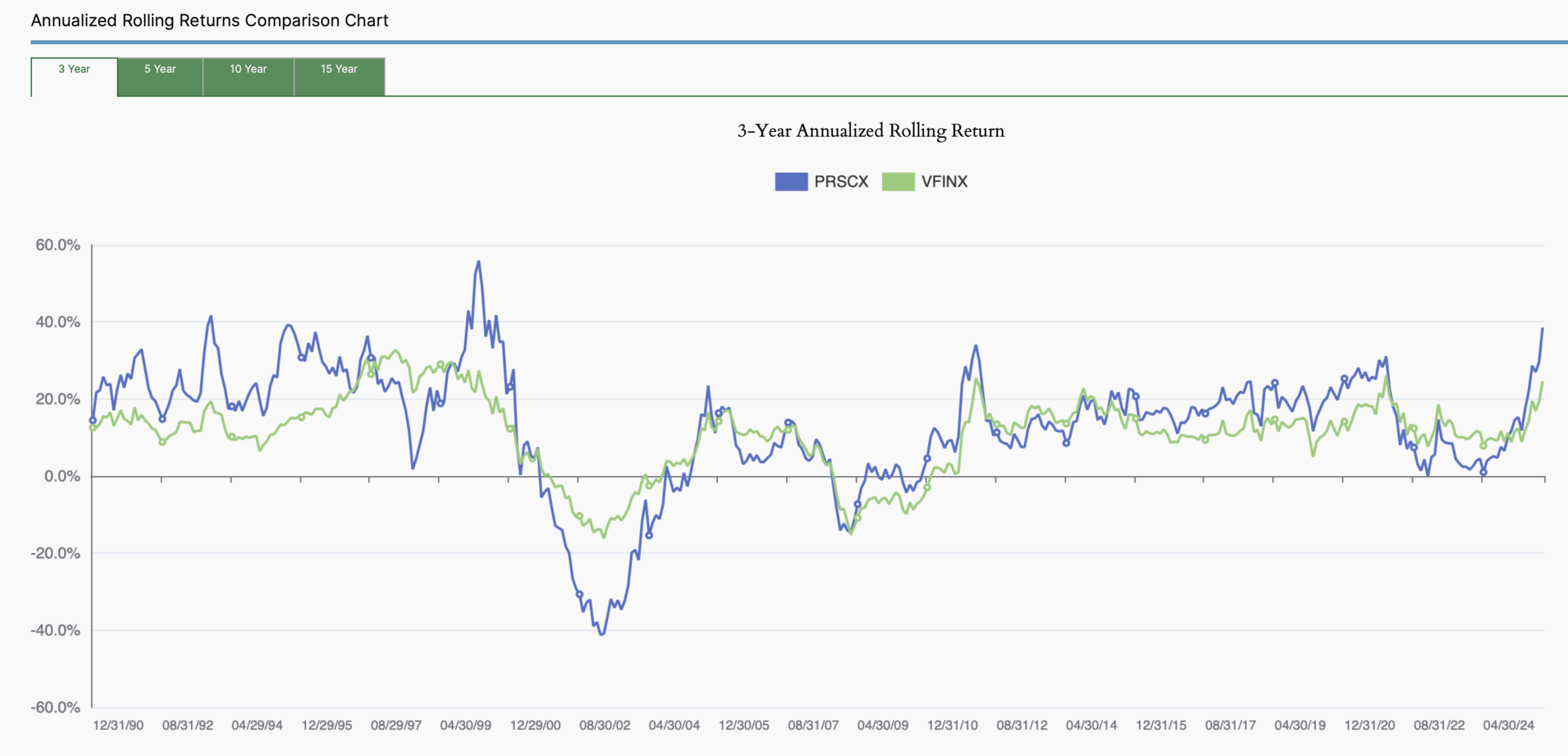
October 2025 MyPlanIQ Portfolio Update
- Why Long-Term Investors Should Embrace Technology: Tech Investment Growth, Risks and Opportunities
- Some Selective Tech ETFs
- Economic & Market Indicators
- Model Portfolios
- Funds to Watch
- Market Overview
-

How Much Cash Do You Need?
- Latest in Retirement Savings & Personal Finance: Stocks Most Expensive,Low Number of Job Postings,Naming Your Baby $30K A Pop
- How Much Cash Do You Need?
- Tools & Tips: Emergency Income Checker
- Market Overview
-
HSA: One of The Biggest Tax Break You Shouldn’t Ignore
- Latest in Retirement Savings & Personal Finance: What Fed Rate Cut Means for You? Surge in Electricity Prices
- Health Savings Account (HSA): One of The Biggest Tax Break You Shouldn’t Ignore
- Tools & Tips: HSA Savings Calculator
- Market Overview
-
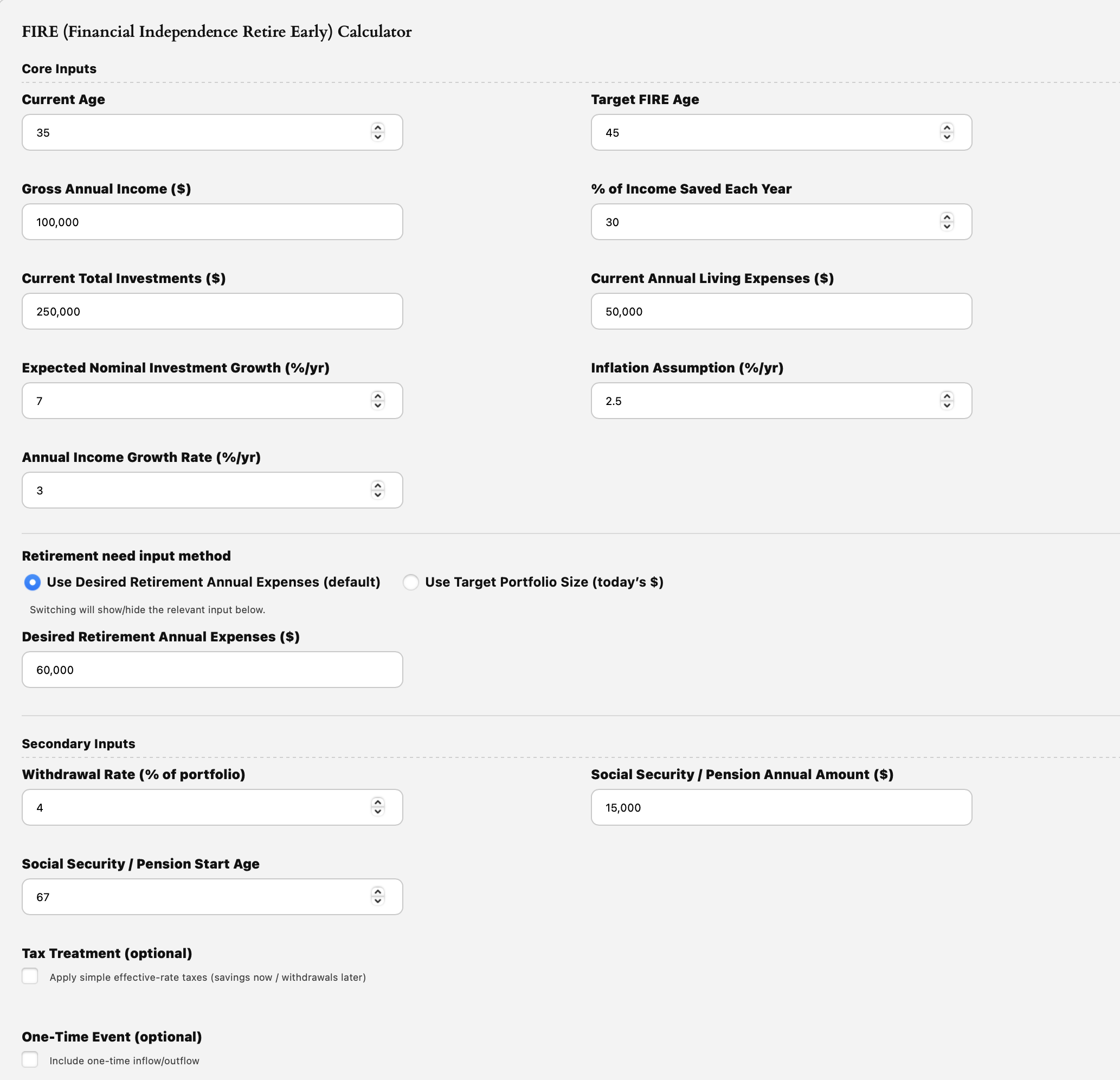
Good Time to FIRE (Financial Independence Retire Early)?
- Latest in Retirement Savings & Personal Finance: Fed to Cut Rate, AI Big Spend, Oracle of Oracle
- Good Time to FIRE (Financial Independence Retire Early)?
- Tools & Tips: FIRE (Financial Independence Retire Early) Calculator
- Market Overview
-
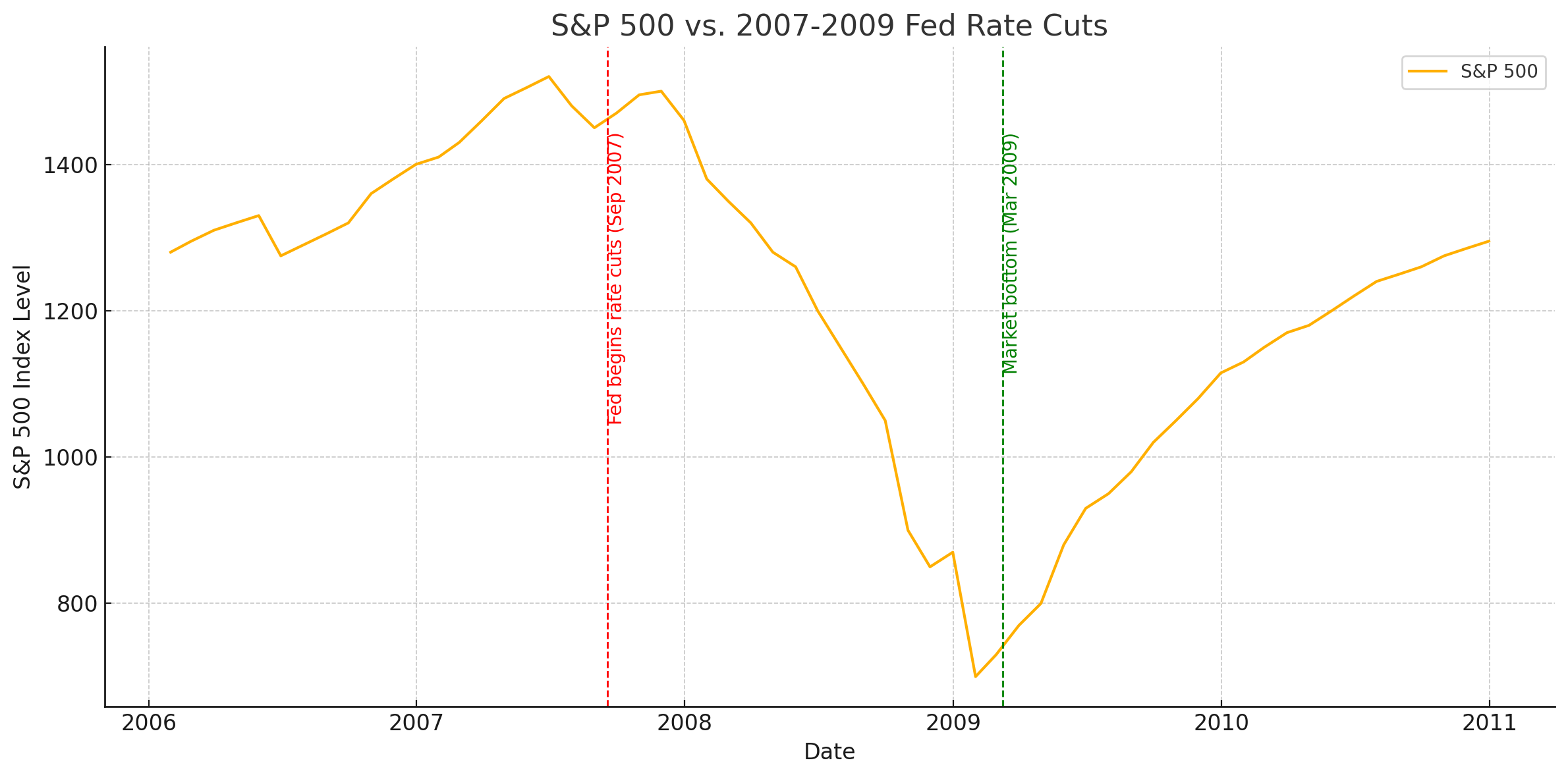
When the Fed Cuts Rates, What Really Happens to Stocks?
- Latest in Retirement Savings & Personal Finance: Job Growth Slowed, Gen Z Dipped into Retirement Savings, Best S&P 500 Earnings in Four Years
- When the Fed Cuts Rates, What Really Happens to Stocks?
- Tools & Tips: Total Compensation Calculator
- Market Overview
-
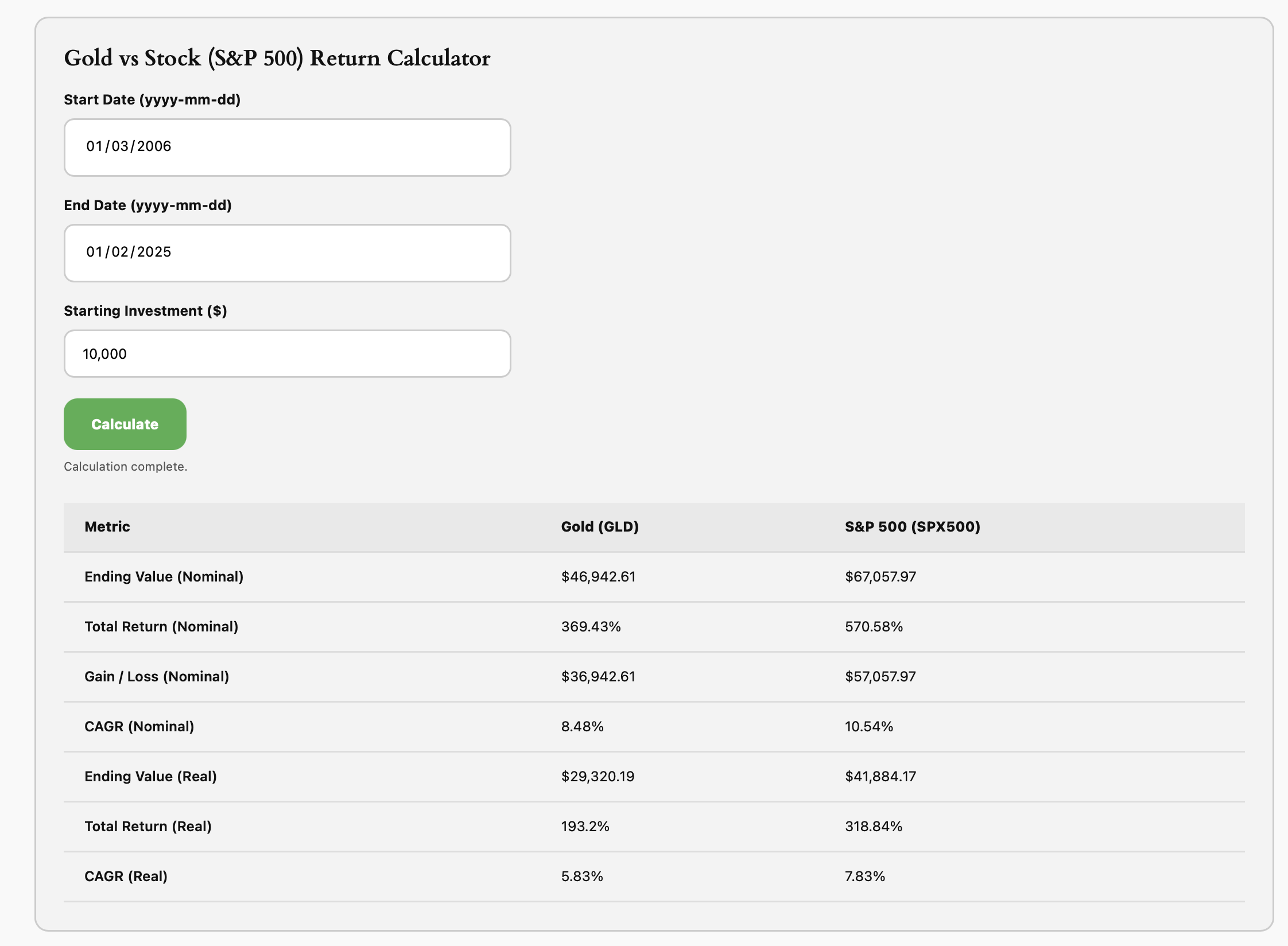
Gold Shines as a Store of Value
- Latest in Retirement Savings & Personal Finance: Rise in U.S. Bankruptcies, Surging Long-Term Bond Yields Worldwide
- Gold Shines as a Store of Value
- Tools & Tips: Gold vs Stock Return Calculator
- Market Overview
-
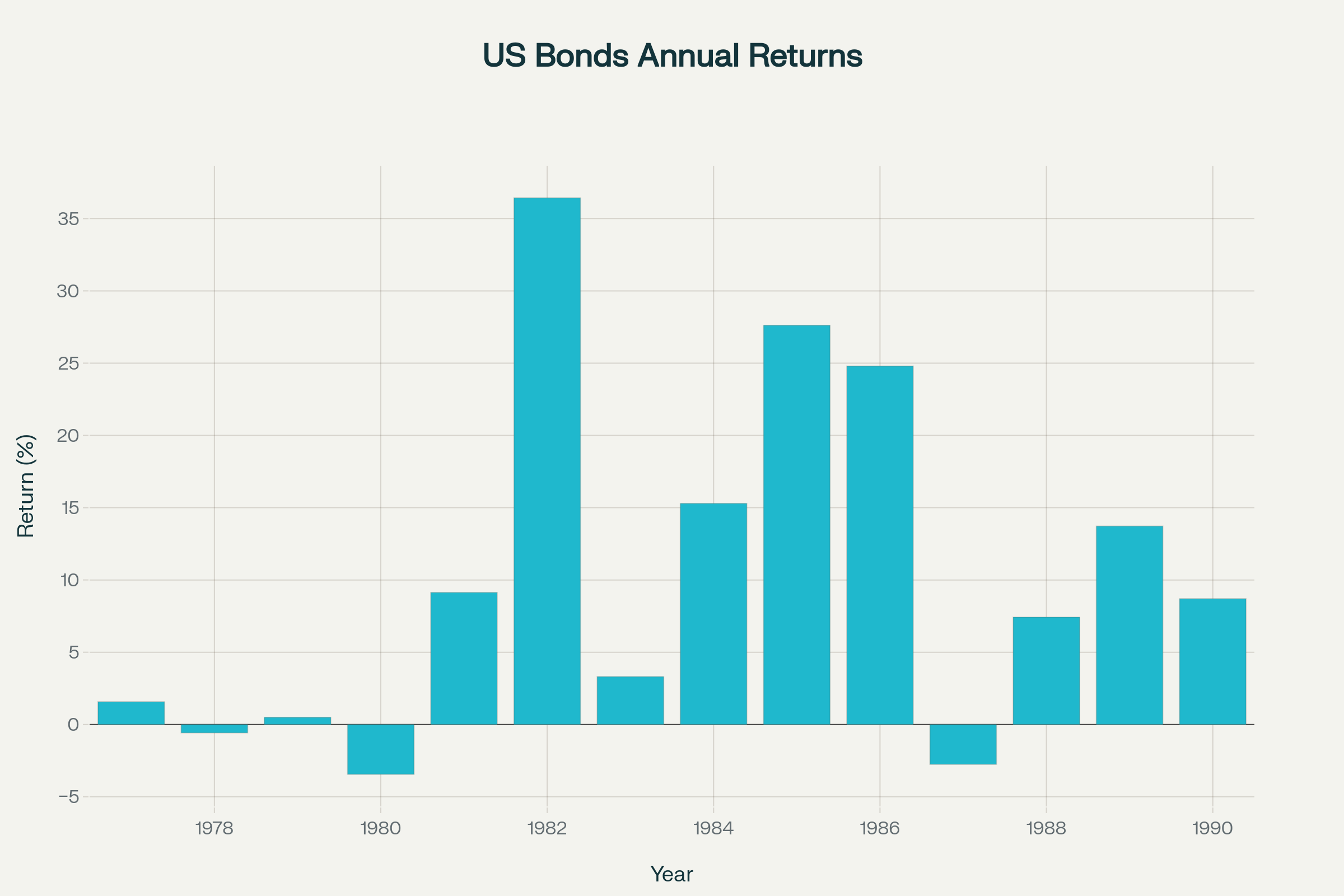
September 2025 MyPlanIQ Portfolio Update
- Stock and Bond Returns in the Next Decade
- Conservative Allocation Funds Review
- Economic & Market Indicators
- Model Portfolios
- Funds to Watch
- Market Overview
-

Saving and Investing for College in a World of Runaway Tuition
- Latest in Retirement Savings & Personal Finance: Runaway College Tuitions, Vanguard Now Recommends 30% Stocks 70% Bonds
- Social Security at Risk: Saving and Investing for College in a World of Runaway Tuition
- Tools & Tips: 529 Plan Tax Savings Calculator
- Market Overview
-
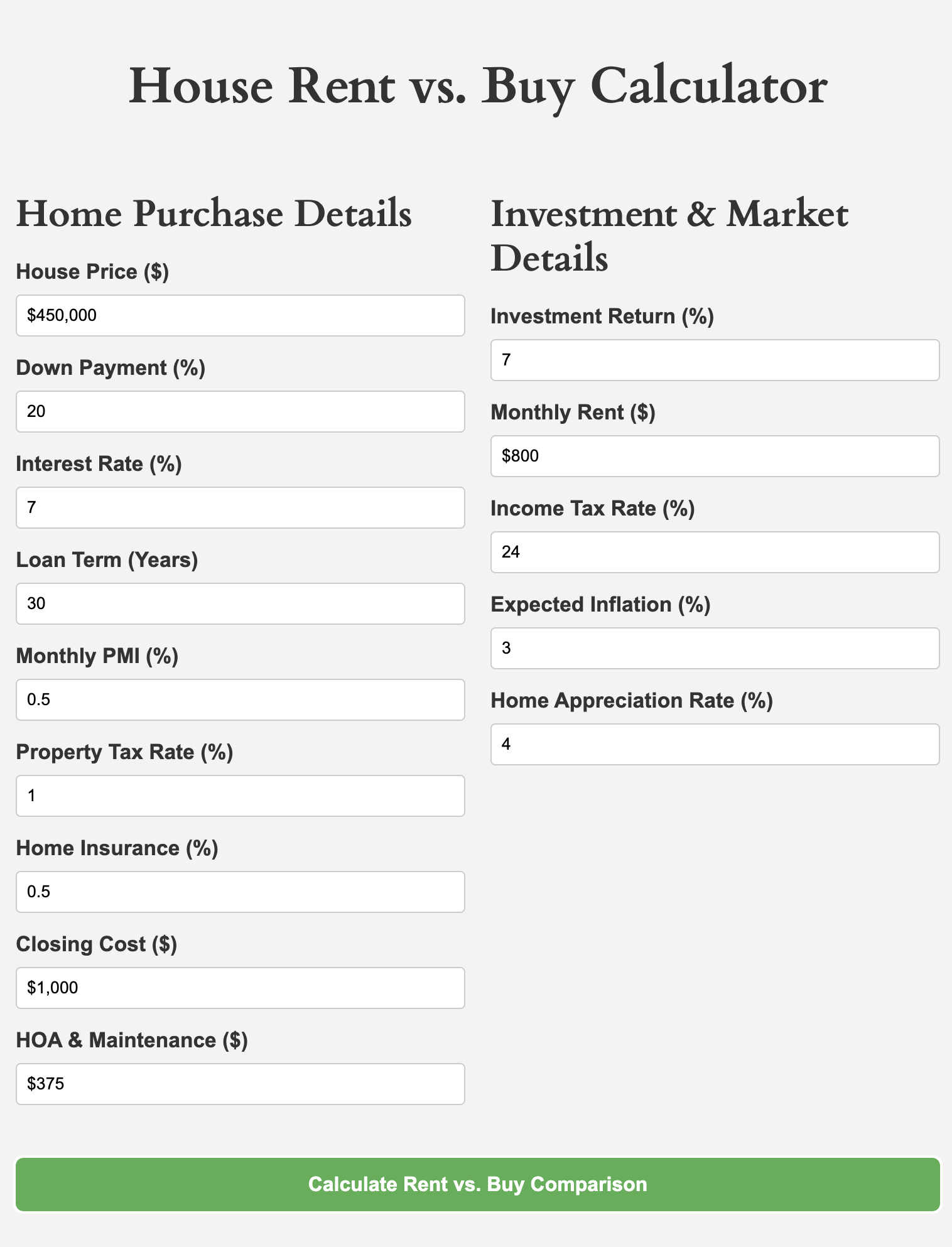
Home Rent vs. Buy: That’s A Great Question
- Latest in Retirement Savings & Personal Finance: Social Security COLA Expected to 2.7%, Consumers Hit 70% Tariff by October
- Social Security at Risk: Home Rent vs. Buy: That’s A Great Question
- Tools & Tips: Home Rent vs. Buy Calculator
- Market Overview
-
Social Security at Risk: 2033 Deadline and What to Do
In this issue:
- Latest in Retirement Savings & Personal Finance: U.S. Household Debt Breakdown, Student Loan Reform, Private Equity & Crypto in 401(k)s
- Social Security at Risk: 2033 Deadline and What to Do
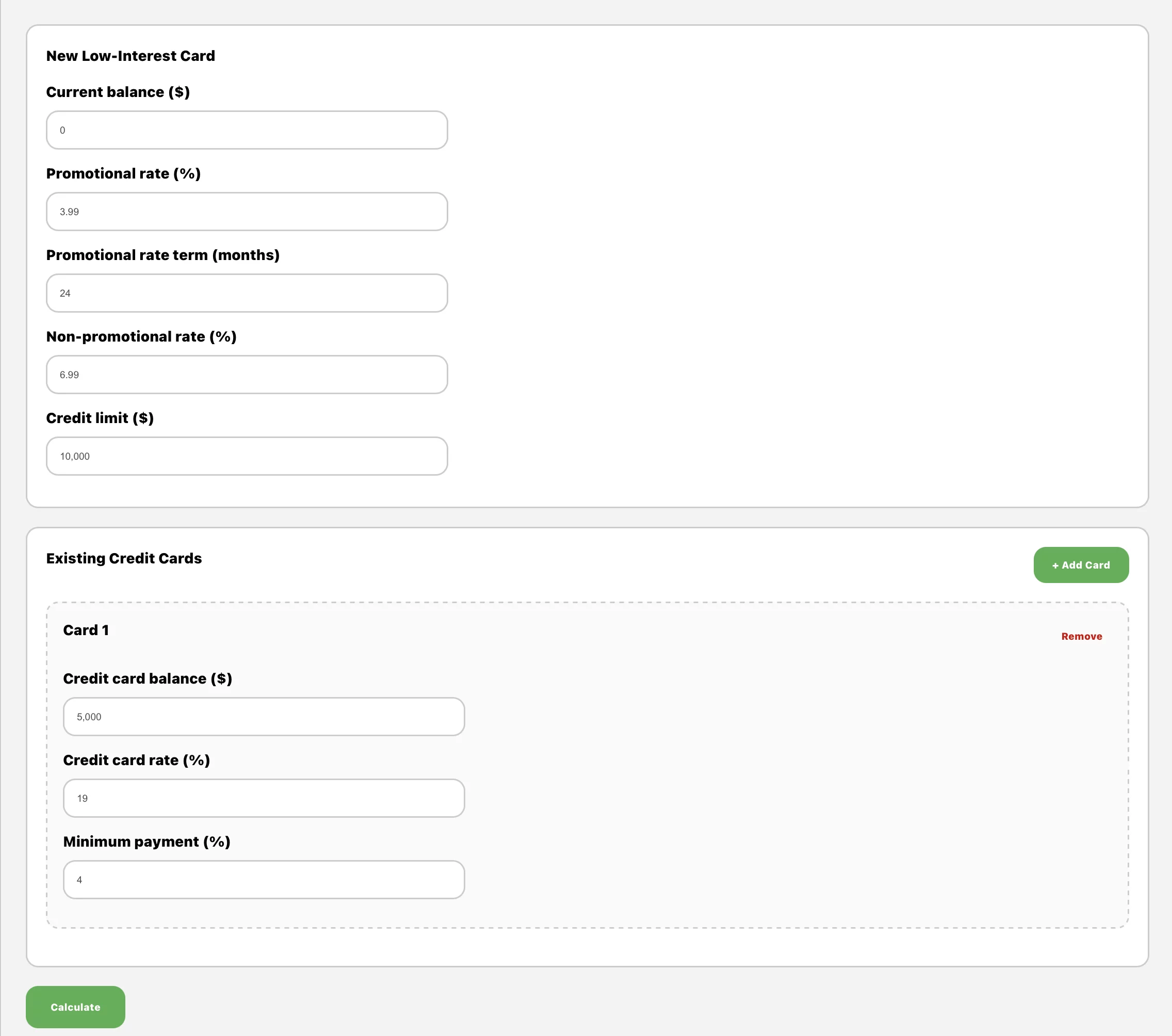
- Tools & Tips: Credit Card Balance Transfer Optimizer
- Market Overview
-

Business Development Companies (BDCs) for High Income
Business Development Companies (BDCs) are highly volatile but providing very high income. Managed conservatively, these stocks can be part of income investors’ portfolios.
-

Chasing Income with Those High Yield ETFs. Smart or Misleading?
In this issue:
- Latest in Retirement Savings & Personal Finance: Missed Car Loan at a Record Level, Employment Numbers Revised Down Sharply, 31% of Retirees Considering Returning to Work
- Chasing Income with Those High Yield ETFs. Smart or Misleading?
- Tools & Tips: ULTY or MSTY Dividend Calculators
- Market Overview
-

August 2025 MyPlanIQ Portfolio Update
In this issue:
- Residential Real Estate vs. Stock Investments
- Fund Analysis: PIMCO Multisector Bond ETF PYLD
- Economic & Market Indicators
- Model Portfolios
- Funds to Watch
- Market Overview
-
The Most Reliable Retirement Savings: Why $1.8 Million is a Popular Lie
In this issue:
- Latest in Retirement Savings & Personal Finance: Retirement Savings Still Fall Short, Sluggish Home Sales & The Most Overvalued Stock Market
- The Most Reliable Retirement Savings Needed: Why $1.8 Million is a Popular Lie
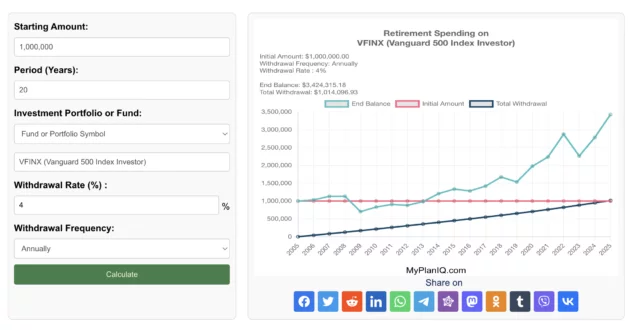
- Tools & Tips: Retirement Spending Calculator Based on a Portfolio, Fund, or Stock
- Market Overview
-

The Most Reliable Retirement Savings Amount You Need in 2025
You’ve probably come across those big retirement numbers that show up in media or surveys. Most of them sound a lot higher than what many people can actually save. Here are some popular ones: In this article, we will walk you through to show how an American with median income needs far less than the above headline numbers to retire at a similar quality life before retirement. A simple retirement spending formula is to utilize so called 4% wtihdrawal rule: the conventional wisdom goes that if you manage to withdraw 4% every year in a conservative investment portfolio (such as 70% in bonds and 30% in stocks), you probably will end up being able to extend your capital beyond 25 years: remember spending 4% every year in an account without much investment gain will deplete the account completely in 25 years (100%/4%=25). Financiall planners often use this 4% as a rule of thumb to gauge how much retirement income you need. Or put it another way, if you need to spend $10,000 a year, you would need to save $10,000 * 25 =$250,000 income before the retirement. So here are some numbers we can play with a typical American of 65 year old with median income: According to BLS data summarized by SmartAsset, full‑time workers aged 65+ earn a median of roughly $60,268 per year. Financial planners generally advise replacing 75%–85% of pre‑retirement income; Schwab specifically recommends about 80%. That puts your retirement income target at about $48,000 annually. Meanwhile, the average newly retired worker collects about $2,000 per month in Social Security, or $24,000 per year, as of 2025. That equates to Social Security covering nearly half your income goal, leaving a gap of $24,000 per year. Under the 4% safe withdrawal rule, you’d need only $24,000 * 25 = $600,000 (as 100%/4%=25) in savings to generate that supplemental income. This is far less than the headline figures! Why $600K Can Be Enough That’s not to say larger balances are useless. But if you can invest $600K conservatively and consistently earn about 4% after inflation, that portfolio should support a stable $24,000 annual withdrawal. It could last decade, and you can still manage to leave something over at the end. This amount also reduces pressure to chase high‑risk strategies during market fluctuations. In comparison, obsessing over a $1.8 million goal may mislead you into delaying retirement unnecessarily or taking undue risks. Why Realistic Targets Matter — Both Psychologically and Economically Setting an overly ambitious savings target like $1.8 million can create anxiety, discouragement, or inaction. Many people in their 50s or 60s with $300K–$400K saved may feel they’ve already failed, even if they are on track for a comfortable retirement based on income replacement. That psychological burden can erode confidence and planning energy. Economically, inflating your savings goal can steer you toward riskier investments or unnecessary financial austerity in your productive years. By contrast, a realistic target tied to your actual needs lets you invest steadily, spend reasonably now, and retire with clarity. It also makes you to focus on your investment portfolio risk, something you can manage with tools like MyPlanIQ’s Fixed‑Income and Tactical Portfolios, which aim for low‑volatility, inflation‑beating performance for retirement savings. Individuals Vary Of course, the above is just a ‘typical’ American. For all of us, we are anything but an exact typical. For people who have higher income, you can easily see that your retirement savings needed for a comfortable retirement life can double or even triple (for a person with $180,000 annual compensation before retirement, for example). Of course for such a person with $180,000 before retirement, she or he indeed might need 3*600,000 or $1.8m savings! The point is, everyone should take time to run some numbers using the basic rule of thumb discussed in this article to understand their own situation. Headline figures are just headlines. They meant to grab your attention. But the real story is always in the details.
-

The Best Age (62, 67, or 70) to Claim Your Social Security Benefits
In this issue:
- Latest in Retirement Savings & Personal Finance: Social Security Benefit Tax in One Big Beautiful Bill, The Worst US Treasury Bond Returns in History!
- The Best Age (62, 67, or 70) to Claim Your Social Security Benefits
- Tools & Tips: Social Security Benefit Claim Age Calculator
- Market Overview
-
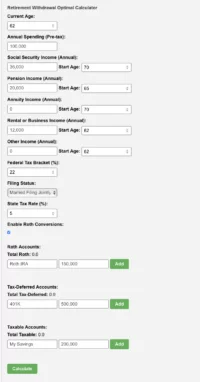
Retirement Withdrawals in Optimal Order
In this issue:
- Latest in Retirement Savings & Personal Finance: Amazon Prime Day Record Sales, Inflation Rise Again? Underestimating Hobby and Pastime Costs
- Retirement Withdrawals in Optimal Order
- Tools & Tips: Retirement Withdrawal Optimal Calculator
- Market Overview
-

Best Strategy to Withdraw Funds in Retirement
When you retire, the order you pull funds from your accounts (whether taxable, traditional, or Roth) can make big difference.
